Genmitsu 3018-PROVer V2 CNC Router Review 2026: Still Worth It?
Buying your first CNC machine feels like a big leap. You want a machine that cuts real parts, not a toy that rattles itself apart on day two. The Genmitsu 3018-PROVer V2 sits right in that sweet spot for beginners.
It arrives mostly assembled, it includes the safety parts that cheaper kits skip, and it costs less than most hobby 3D printers. But a small desktop CNC also comes with real limits, and plenty of buyers find those limits the hard way.
This review covers the unboxing, the setup, the cutting results, the noise, the software headaches, and the honest weak spots. Read on before you spend your money.
In A Nutshell:
- Mostly pre assembled. SainSmart ships the frame, control board, emergency stop button, limit switches, and cable management already installed. The company claims 20 to 35 minutes of assembly. Real users often report closer to one or two hours on their first build.
- Small but honest work area. You get 290 x 180 x 40mm of travel, or roughly 11.4 by 7.1 by 1.6 inches. That suits signs, coasters, inlays, PCBs, and small boxes. It does not suit guitar bodies or cabinet doors.
- Weak stock spindle. The 775 spindle spins at about 10,000 RPM on a 24V 4A supply. Wood, acrylic, PCB blanks, and soft aluminium all work with shallow passes. Hardwood and steel do not.
- Smart control board. The 32 bit board adds an MPG port, a 3 pin laser port, and an air assist pump port. The TB67S109 drivers run quieter than the older DRV8825 boards.
- Great support reputation. SainSmart ships replacement parts quickly, and the user community is large and active. That matters more than spec sheets when something breaks.
- Best for learners, not producers. Treat this machine as a teaching tool that pays for itself in skills, then upgrade later.
Genmitsu 3018-PROVer V2 CNC Router Overview


Last update on 2026-10-21 / Affiliate links / Images from Amazon Product Advertising API
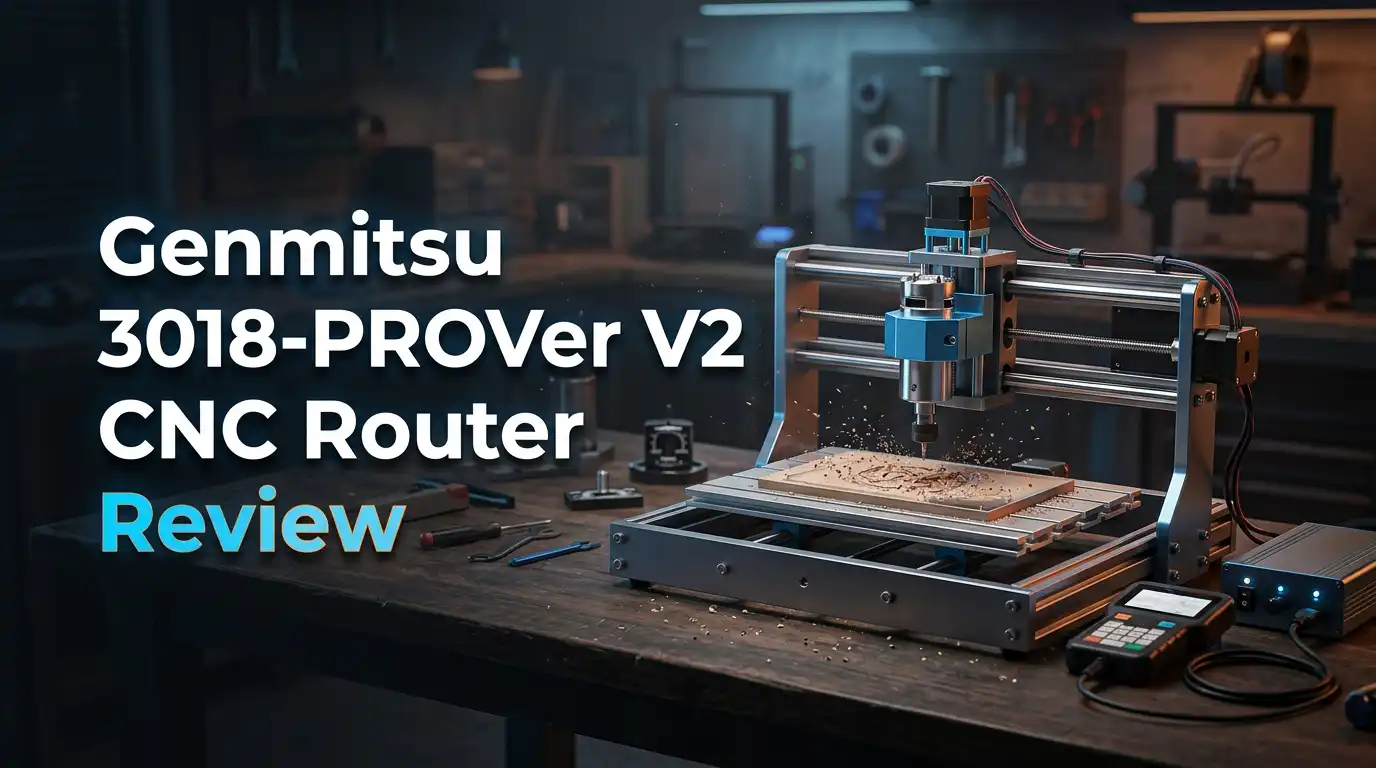
The 3018-PROVer V2 is the refreshed version of SainSmart’s most popular desktop CNC. The name tells you the basics. The 30 and the 18 refer to the 300mm by 180mm bed footprint, and PROVer marks the step above the bare bones 3018-PRO kit.
The frame is all aluminium, including a one piece machined and moulded aluminium spoilboard. Motion runs on linear shafts and leadscrews, which keeps costs down but limits speed. A 32 bit control board replaces the old 8 bit board, and the machine ships with home switches, limit switches, an emergency stop, and a Z axis touch probe.
Everything a beginner actually needs is in the box. That is the real pitch here. You are not buying a kit and then spending another $120 on safety upgrades.
Unboxing Experience And First Impressions
The box arrives heavier than you expect for a machine this small. Roughly 20 pounds of aluminium sits inside dense foam cutouts, and nothing shifts in transit. That first lift gives a good signal about build quality.
Open the top layer and you find the gantry already bolted together. Underneath sit the base, the spindle, the acrylic side panels, and a parts tray. SainSmart includes 4 clamps, 10 engraving bits, a Z probe, an emergency stop knob, hex keys, and spare screws. The screws come sorted into labelled bags, which saves real frustration.
The printed manual is short and mostly pictures. Most buyers end up watching the official assembly video instead. First impressions are positive. The aluminium feels solid, the anodising is clean, and the stepper motors have reassuring weight.
Assembly Time And Setup Process
SainSmart advertises 20 to 35 minutes. That number is optimistic for anyone who has never built a machine before. One long term reviewer took two full hours on the earlier PROVer, and said he could repeat it in 45 minutes with hindsight. Expect 60 to 90 minutes for your first build.
None of the steps are hard. You bolt the gantry to the base, mount the spindle holder, attach the acrylic panels, plug in the labelled cable harness, and screw down the spoilboard. No soldering. No wiring diagrams.
The slow part is checking squareness. Take your time here. A gantry that sits slightly out of square will show up in every cut you make for the next two years. Loosen, tap, and retighten until the Z axis reads true against a machinist square.
Top 3 Alternative for Genmitsu 3018-PROVer V2 CNC Router

Last update on 2026-10-21 / Affiliate links / Images from Amazon Product Advertising API
Genmitsu 3020-PRO MAX V2 CNC Router Machine

Last update on 2026-10-21 / Affiliate links / Images from Amazon Product Advertising API
Genmitsu PROVerXL 4030 V2 CNC Router Machine

Last update on 2026-10-21 / Affiliate links / Images from Amazon Product Advertising API
Genmitsu 4040-PRO CNC Router Machine
Working Area And Size Limits
The quoted travel is 290 x 180 x 40mm. The usable area shrinks once clamps enter the picture. Two clamps on the Y axis eat roughly 25mm of length, so plan for about 250 x 160mm of real cutting space.
The Z axis number deserves extra attention. The 40mm figure describes how far the spindle can travel, not how deep you can cut. Standard router bits for this machine have short flutes. Most buyers cut no deeper than 10 to 12mm in a single setup, using several shallow passes.
That is fine for coasters, name signs, phone stands, PCB milling, and small jewellery moulds. It is not fine for thick hardwood carving. Measure your planned projects before you order, because this limit frustrates more new owners than any other spec.
Spindle Power And Cutting Performance
The stock spindle is a 775 motor, 42mm in diameter, rated at roughly 10,000 RPM. It draws from a 24V 4A supply, which puts real output somewhere around 100 watts. Compare that to a trim router at 710 watts and the gap becomes clear.
In practice the machine cuts pine, poplar, MDF, plywood, acrylic, PCB blanks, carbon fibre sheet, and soft aluminium. Hardwoods like maple and oak are possible with light passes and sharp bits, but progress is slow.
Shallow and steady wins here. A 0.5mm depth of cut at 400mm per minute produces clean edges. Push to 2mm and the spindle bogs, the leadscrews chatter, and bits snap. One reviewer broke a bit on his first job for exactly this reason.
Control Board, Software And Offline Control
The V2 runs a 32 bit board with TB67S109 drivers. Those drivers are noticeably quieter than the older generation. The board adds three ports the old version lacked: an MPG handwheel port, a 3 pin laser port, and an air assist pump port.
Software follows the standard GRBL chain. You design in CAD, generate toolpaths in CAM, then stream G code to the machine. Easel, Fusion 360, and Carveco Maker all handle the first two steps. Candle, UGS, and Easel handle the sending.
The optional offline controller reads G code from an SD card, so you can run jobs without tying up a laptop. That feature is worth the small extra cost. Several owners also prefer setting Z zero through the offline controller rather than the probe.
Z Axis Touch Probe And Limit Switches
The upgraded Z probe is a genuine improvement. Two indicator lights tell you what is happening. Blue confirms the probe is connected to the board, and red confirms the bit has made contact. That removes a lot of guesswork.
Limit switches on X, Y, and Z come pre installed and pre wired. They protect the machine from crashing into its own frame. They do not set your workpiece zero, which confuses newcomers who arrive from 3D printing.
One known quirk shows up often. If the spindle spins but the axes refuse to move, the upper Z limit switch is usually triggering. Typing $21=0 in the GRBL console disables limit checking, after which you rehome and rerun the job. SainSmart documents this fix directly.
Noise, Dust And Workspace Reality
Nobody warns you enough about dust. A CNC removes material, and that material becomes a fine cloud that settles on everything within three metres. MDF is the worst offender.
Noise sits around 70 to 80 decibels during cutting, mostly from the spindle and the bit. It is louder than a 3D printer and quieter than a shop vac. A 30 minute job will annoy anyone in the same room.
Plan for a garage, a basement, or a dedicated enclosure. SainSmart sells a matching enclosure, and a 42mm dust shoe fits the stock spindle. One reviewer admitted the dust alone got his machine banished from the house. Budget for dust control from day one, not after your first complaint.
What The Genmitsu 3018-PROVer V2 Does Not Do Well
Honest reviews list the failures. Here are the real ones.
The plastic X and Z axis assemblies are the weakest structural element. On older PROVer units, the leadscrew nut was a press fit into that plastic holder. When it loosened, the spindle plunged into the workpiece mid job. SainSmart replaced the assembly free within four days, but the design point stands.
The included bits are engraving bits only. Ten 20 degree V bits suit lettering and PCB work. They produce poor results on 3D contours, and they leave torn fibres when cutting with the wood grain. Buy ball nose end mills immediately.
There is no 4th axis support, no wireless app control, and no closed loop feedback. Max feed rates stay low because of the leadscrew design. This is a learning machine, and it behaves like one.
Pros And Cons Of The Genmitsu 3018-PROVer V2
Pros
- Fast setup. Most of the hard assembly is already done, so you can be cutting on the same day the box arrives.
- Complete safety package. Emergency stop, home switches, limit switches, and a Z probe all come standard rather than as paid add ons.
- Solid aluminium build. The frame and one piece machined spoilboard feel far better than the price suggests.
- Quiet 32 bit electronics. TB67S109 drivers reduce stepper whine, and the extra ports allow laser and air assist upgrades later.
- Excellent support. SainSmart ships replacement parts quickly, and the official Facebook user group answers questions within hours.
- Low entry price. Street prices have hovered near $270 to $350, which is modest for a complete CNC setup.
Cons
- Tiny work envelope. Real usable area drops to roughly 250 x 160mm once clamps are fitted.
- Underpowered spindle. 10,000 RPM at around 100 watts means slow going in hardwood and no steel at all.
- Plastic axis assemblies. The weakest part of the machine, and the most common failure point.
- Engraving bits only. The bundled bits cannot handle 3D carving, so expect an extra bit purchase.
- Dust and noise. You need a dedicated space, a dust shoe, and ideally an enclosure.
- Software learning curve. The CAD, CAM, and sender workflow takes a few weeks to feel natural.
Who Should Buy This CNC Machine
This machine fits three groups well. Complete beginners get a safe, forgiving platform with a huge support community behind it. You learn feeds, speeds, workholding, and G code without risking a $2,000 investment.
Hobbyists making small items also do well. Coasters, keychains, inlays, model parts, PCB prototypes, and acrylic panels all fall inside the work envelope comfortably.
Teachers and makerspaces benefit from the emergency stop, the limit switches, and the low replacement cost of consumables.
Skip it if you plan to sell furniture, cut thick hardwood, or mill steel. Those jobs need a stiffer frame and a real router spindle. Buyers in that position should look at the 4040-PRO MAX with its 710W trimmer, or a PROVerXL class machine instead.
Price And Value In 2026
Pricing has drifted between roughly $270 and $350 depending on sales and bundles. At the lower end, the value is genuinely strong. You receive an aluminium machine, safety hardware, a Z probe, clamps, bits, and a spoilboard for less than many people spend on a mid range 3D printer.
Factor in the real total cost before deciding. A set of decent end mills runs $30 to $50. A dust shoe adds about $25. The offline controller adds a little more. An enclosure costs considerably more again.
Realistic all in spend lands near $400. That still represents fair value for the capability, and the resale market for Genmitsu machines stays healthy if you later outgrow it.
Final Verdict On The Genmitsu 3018-PROVer V2
Last update on 2026-10-21 / Affiliate links / Images from Amazon Product Advertising API
The Genmitsu 3018-PROVer V2 earns a recommendation with clear conditions. It is one of the easiest ways to learn CNC work, and it delivers clean results inside its small envelope. The aluminium frame, the 32 bit board, and the complete safety kit all justify the price.
It is not a production machine. The spindle is weak, the plastic axis assemblies are a known weak point, and the work area will feel cramped within a year. Owners who accept those limits stay happy. Owners who expect furniture grade output do not.
Buy it to learn. Expect to upgrade in two years, and expect that upgrade to feel earned rather than forced.
Frequently Asked Questions
Can the Genmitsu 3018-PROVer V2 cut aluminium?
Yes, soft aluminium works with shallow passes, sharp single flute bits, slow feed rates, and cutting fluid. Expect depths near 0.2mm per pass. Hardened alloys and steel are beyond this machine.
Do you need a computer to run it?
No, provided you add the offline controller. You copy G code onto an SD card and run the job directly from the controller. Without it, you stream G code from a laptop using Candle or UGS.
What software works best for beginners?
Easel is the gentlest starting point because it handles design, toolpaths, and sending in one place. Fusion 360 offers far more power once you are comfortable. Carveco Maker suits relief carving work.
How long does assembly really take?
Plan for 60 to 90 minutes on your first build, despite the 20 to 35 minute claim. Squaring the gantry carefully consumes most of that time and pays off in cut quality.
Can you add a laser module?
Yes. The control board includes a 3 pin laser port and an air assist pump port. The compatible CFL55P compressed spot laser module mounts in place of the spindle.
Is the work area expandable?
SainSmart has worked on Y axis extension kits for the 3018 family. Availability changes often, so check current listings before you count on it.

Hi, I’m Leah Ray — the voice behind CraftBench Vault. I’m a passionate woodworking enthusiast dedicated to reviewing the best wood cutting tools and woodworking products. Through honest research and hands-on experience, I help fellow crafters make smarter buying decisions. Welcome to my workshop!