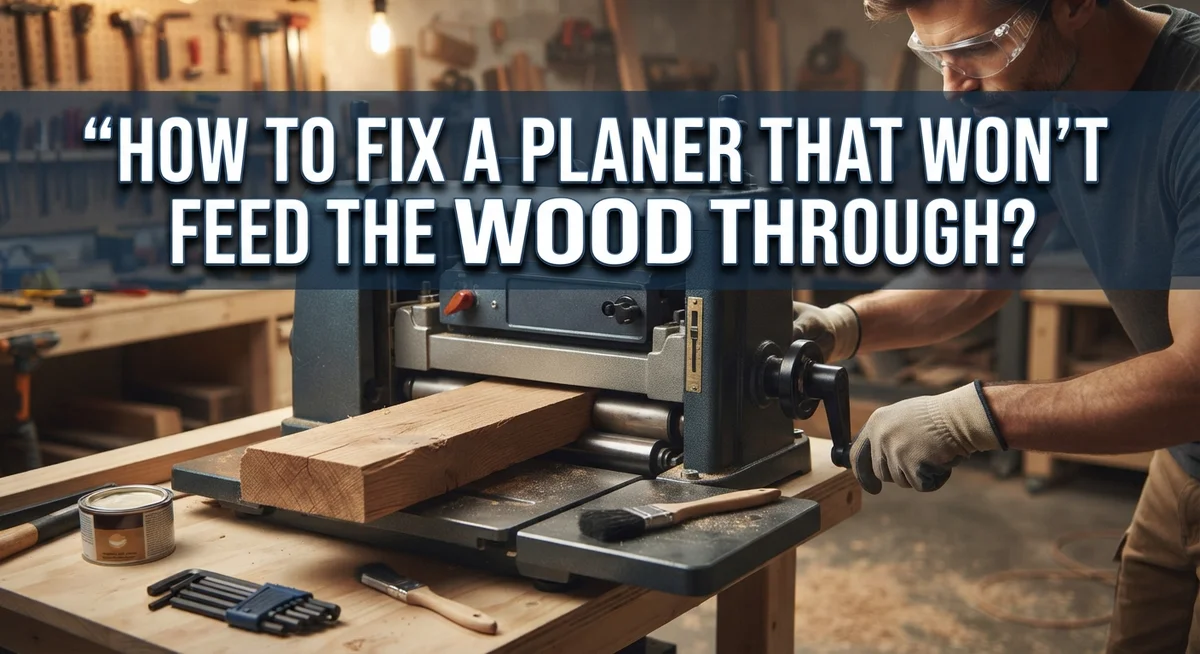
How To Fix A Planer That Won’t Feed The Wood Through?
Your planer suddenly stops feeding the wood, and it’s frustrating. You feed a board in, and nothing happens. The machine hums, but the wood just sits there.
This problem happens to almost every woodworker at some point. The good news is that it rarely means your machine is broken.
In most cases, the real culprit is something simple. Sawdust buildup on the rollers, dull knives, or high friction on the bed can all stop the wood from feeding smoothly.
Sometimes the feed speed dial gets stuck between settings too. This tiny detail can bring your entire project to a halt.
In a Nutshell
- Unplug the planer first. Safety comes before any inspection or repair work.
- Check the rollers for sawdust. Buildup on rollers reduces grip and stops wood from feeding smoothly.
- Look at your knives. Dull blades create resistance that fights against the feed mechanism.
- Wax the bed and tables only. Never apply wax to the rollers, since this reduces the grip you need.
- Confirm your feed speed dial is set properly. A dial stuck between positions will cause feeding issues.
- Keep your board parallel as it enters and exits the cutter. Misalignment often causes wood to jam or stall.
Why Planers Stop Feeding Wood: Understanding the Root Causes
Your planer stops feeding wood for a few specific reasons. Understanding these causes helps you fix the problem fast.
Sawdust buildup on rollers is the most common culprit. Over time, dust and wood particles collect on the rubber or metal rollers that grip your board. This buildup reduces traction, and the rollers can’t push the wood through anymore. The machine still tries to feed, but the wood just sits there.
Dull knives create excessive resistance. When your cutting blades lose their sharpness, they don’t slice cleanly through the wood. Instead, they tear and crush the fibers. This increased friction makes it harder for the feed system to move the board forward. Your planer works harder, but the wood barely moves.
High friction on the bed and tables prevents smooth feeding too. Dust, resin, and old wax buildup on these surfaces create drag. The board sticks instead of gliding, and the rollers can’t overcome this resistance.
Feed speed dial problems also cause feeding failures. If your speed dial sits between two settings instead of clicking firmly into place, the feed mechanism won’t engage properly. The rollers won’t activate at all, leaving your wood stationary.
Baseplate misalignment affects feeding as well. When your planer’s baseplate isn’t parallel to the cutter head, the board enters at an angle. This creates uneven pressure and binding, stopping the feed system.
The core issue across all these problems is friction or contamination. Your planer isn’t broken. The feed rollers simply can’t grip or push the wood because something is blocking them or making the job too hard.
Safety First: Preparing Your Planer for Inspection
Before you start inspecting your planer, safety must come first. This means taking steps to prevent injury while you work on the machine.
Unplug the planer immediately. This is the most important step you can take. Even if the machine is off, electrical power can still flow through it. Unplugging removes all power completely. Never work on a planer while it remains plugged in.
Wait a few minutes after unplugging. The motor needs time to stop spinning completely. Touching moving parts can cause serious cuts or bruises. Give the machine time to come to a full stop.
Clear your work area of clutter. Remove any wood scraps, tools, or other items from around the planer. You need plenty of space to move safely and access all parts of the machine.
Wear appropriate safety gear. Safety glasses protect your eyes from dust and debris. Work gloves help protect your hands from sharp edges. Avoid loose clothing that could get caught in the machine.
Make sure you have good lighting. You need to see inside the planer clearly. Use a flashlight or work light to inspect rollers, knives, and the bed. Poor lighting makes it hard to spot problems.
Take time to read your planer’s manual before starting. Different models have different designs. Your manual shows you the specific parts and how they work. This helps you understand what you are looking for.
Keep your phone nearby. If you encounter something unexpected, you can look up information quickly. Having a helper present is also smart. Someone can assist you or call for help if needed.
Step-by-Step Diagnostic Checklist for Feed Problems
Start your diagnostic work by checking the feed roller. This component grips your wood and pulls it through the machine. Sawdust accumulation is the primary reason rollers lose their grip. Use a soft brush or compressed air to remove debris from the roller surface.
Next, inspect the knives closely. Dull blades force the machine to work harder, creating resistance that prevents smooth feeding. Run your finger carefully along the knife edge (away from the sharp side). A sharp blade feels noticeably different from a dull one. If your knives are dull, they need sharpening or replacement.
Check your feed speed dial next. This control knob must sit firmly in one position. If it sits between two settings, your machine won’t engage the feed mechanism properly. Turn the dial until it clicks into place.
Examine the bed and tables for buildup. Sawdust, resin, and wood residue create friction that stops feeding action. A clean bed allows wood to move freely through your planer.
Look at your baseplate alignment too. If the entry or exit tables aren’t parallel to your cutting head, wood won’t feed smoothly. The board should sit flat and level as it approaches the knives.
Finally, feel the overall resistance when you manually push the wood through (with the machine unplugged). Excessive friction tells you cleaning or waxing will help. Light resistance suggests a knife sharpness problem instead.
Work through each step methodically. Most feeding problems have simple causes you can identify quickly with this checklist.
How to Clean and Restore Roller Grip
Your planer’s rollers are the grip system that moves wood through the machine. When they lose their ability to grip, wood stops feeding. Restoring their grip is often the fastest fix.
Start by unplugging your planer. This keeps you safe during cleaning. Wait a few minutes for any moving parts to stop completely.
Examine both the top and bottom feed rollers closely. Look for sawdust caked onto the roller surface. This buildup acts like a slippery coating that prevents gripping. You’ll see a dull, gray layer if contamination is heavy.
Use a stiff brush to remove loose sawdust first. Brush along the roller direction, not against it. This prevents debris from getting pushed into seams. A soft cloth works next to wipe away remaining dust.
For stubborn buildup, use mild detergent mixed with water. Dip a cloth into the solution and wipe the roller surface thoroughly. A soft toothbrush helps clean grooved areas where sawdust hides. Rinse with a barely damp cloth afterward to remove soap residue.
Allow the rollers to dry completely before testing. Moisture can interfere with grip just like sawdust does.
Never apply wax or oil to the rollers themselves. This is a common mistake that makes feeding worse. Rollers need friction to grip wood, not lubrication.
Check that rollers spin freely by hand once they’re clean. They should rotate smoothly without grinding sounds. If a roller feels stuck or rough, it may need replacement.
After cleaning, test your planer with a scrap piece of wood. Feed the board slowly and listen for normal operation. Proper grip should return immediately if contamination was your only problem.
Checking and Sharpening Dull Knives
Dull knives are one of the most common reasons your planer stops feeding wood properly. When blades lose their sharpness, they create extra resistance as they cut. This resistance makes the feed system work harder, and sometimes it simply can’t push the wood through.
Check your knife sharpness first. Unplug the machine and rotate the cutterhead by hand. Look at the blades closely. Sharp knives have a clean, bright edge. Dull knives look rounded or scratched along the cutting edge. Run your finger gently across the blade edge (be careful not to cut yourself). A sharp blade feels crisp. A dull blade feels smooth and rounded.
You can also test sharpness by examining the wood surface after planing. Dull knives leave rough, torn grain patterns. Sharp knives create smooth, clean surfaces. If your recent boards look rough and splintered, your knives need attention.
Dull blades do more than just resist feeding. They also produce excessive heat and vibration. This extra work stresses your planer’s motor and feed system. Fixing dull knives often solves feeding problems immediately.
You have two options: sharpen the existing knives or replace them. Sharpening requires specific tools and skill. Many people find replacement easier and more reliable. Your planer manual explains which method works best for your model.
Don’t ignore dull knives. They create a chain reaction of problems. Start here if your planer struggles to feed wood. Addressing blade sharpness often gets your planer working smoothly again without needing other repairs.
Reducing Friction on the Bed and Tables Correctly
Friction on your planer’s bed and tables is a silent problem that stops wood from moving forward smoothly. When these surfaces collect sawdust and debris, they create drag that prevents the feed rollers from doing their job.
Start by raising your planer head all the way up. This gives you clear access to the entire bed and table surfaces. Use a stiff brush or old toothbrush to sweep away all loose sawdust. Pay special attention to the corners and edges where dust accumulates most.
For stubborn buildup, mix mild detergent with water and wipe the bed and tables with a cloth. Let everything dry completely before moving forward. Wet surfaces create even more friction and can damage your machine.
Apply paste wax to the bed and tables after cleaning. This reduces friction significantly and helps wood slide through more easily. Rub the wax on with a cloth in circular motions, then buff it with a clean cloth until it shines. This step makes a real difference in feed performance.
Here’s what matters most: never wax your rollers. Waxed rollers lose grip and make feeding worse, not better. Wax goes only on the flat surfaces where the wood sits.
Check that your baseplate aligns properly with the bed. A misaligned baseplate creates uneven friction and stops wood from feeding straight through. The wood should sit flat and parallel to the cutting head at both entry and exit points.
After you’ve cleaned and waxed, test your planer with a scrap piece of wood. You should feel noticeably less resistance. Feed problems often disappear once you remove this friction source.
Adjusting Feed Speed Settings and Board Alignment
Your planer’s feed speed dial controls how fast wood moves through the machine. If this dial sits between positions, your planer won’t engage the feed system properly.
Check your feed speed dial first. Unplug the machine and locate the dial on your planer’s control panel. Turn it slowly to feel for a solid click or detent position. If the dial moves smoothly without stopping, it may be stuck between settings. Push the dial firmly into the nearest position until you hear or feel it lock into place.
Board alignment at the entry and exit points affects feeding significantly. Your wood must sit parallel to the cutterhead throughout the planing process. If the board tilts or angles as it enters, the feed rollers can’t grip it effectively.
Measure the distance from your planer’s bed to the cutterhead at the front and back of the machine. Both measurements should match. If they don’t, your baseplate needs adjustment. Consult your planer’s manual for baseplate leveling instructions specific to your model.
Feed speed also depends on wood thickness and hardness. Thicker boards or dense wood species need slower speeds. If your dial allows multiple speed options, try a slower setting first. This gives the rollers more time to grip and push the wood forward.
Test your adjustments with a scrap piece of wood before running expensive material through. Feed the board slowly by hand initially to confirm the rollers engage smoothly. Once you’ve verified proper dial positioning and board alignment, your planer should feed wood consistently again.
Common Mistakes That Make Feed Issues Worse
You can make feed problems much worse by making a few common mistakes during maintenance. Understanding what NOT to do is just as important as knowing what to do.
The biggest mistake is waxing your rollers. Many people think waxing everything will help, but waxed rollers actually lose their grip. Your rollers need friction to grab the wood and push it forward. When you coat them with wax, they become slippery and the wood won’t feed at all. Only wax your bed and tables, never the rollers themselves.
Another serious error is leaving your machine plugged in while you work on it. You might accidentally bump the power switch or the machine could start unexpectedly. Always unplug your planer before you touch any internal parts. This keeps you safe and prevents damage to the machine.
Ignoring dull knives is a mistake that creates a domino effect of problems. Dull blades force the rollers to work harder, which causes them to slip. The wood resists moving forward because the knives can’t cut cleanly. Many people think the feeding system is broken when really the knives just need sharpening or replacement.
Don’t set your feed speed dial between positions either. Your dial should click firmly into place at a specific setting. If it’s stuck between two positions, the feeding system won’t engage properly and the wood won’t move. Check that it’s fully seated before running wood through.
Finally, skip aggressive scrubbing on the bed and tables. Rough cleaning can damage the surface and create new friction points. Use gentle, circular motions with a soft cloth and mild detergent instead.
Final Thoughts
Fixing a planer that won’t feed wood usually comes down to a few simple checks. Most problems start with friction or buildup, not broken parts.
Clean rollers regularly. Sawdust and debris reduce grip fast. A quick wipe with mild detergent keeps them working properly.
Check your knives often. Dull blades add resistance and force the machine to work harder than it should. Sharp knives make feeding smooth and effortless.
Keep the bed and tables waxed. This small step cuts friction and helps wood glide through without sticking. Never apply wax to the rollers themselves.
Always verify your feed speed dial. A dial stuck between settings confuses the machine and stops the wood from moving. Set it firmly on one position before you start.
Board alignment matters too. If the entry and exit points aren’t level with the cutterhead, feeding becomes uneven or stops completely. Take a few minutes to measure and adjust before running your material.
Safety should never be an afterthought. Always unplug your planer before inspecting or cleaning any part of it.
Most feed issues come from simple causes like dirt, dull blades, or incorrect settings. These are easy problems to fix once you know where to look. You rarely need to replace major parts or call a technician.
Take a slow, careful approach each time. Check the rollers, knives, bed, and feed dial in that order. This routine helps you catch small issues before they turn into bigger headaches.
With regular care, your planer will feed wood smoothly and consistently. A little maintenance goes a long way toward keeping your machine reliable for years of woodworking projects.
Frequently Asked Questions
Why does my planer keep jamming wood instead of feeding it smoothly?
Jamming usually happens because sawdust builds up on the feed rollers. When rollers get dirty, they lose grip on the wood. Dull knives also create extra resistance that stops the feeding action. High friction on the bed and tables can prevent the wood from moving forward too. Start by unplugging your machine and inspecting the rollers for dust and debris.
Can I use wax on my planer rollers to help with feeding?
No. This is a common mistake that makes things worse. Waxing rollers reduces their grip, which is the opposite of what you need. Apply paste wax only to the bed and tables, never the rollers. Waxed surfaces help wood slide smoothly without affecting the rollers that grip and move the material.
What should I check first when my planer stops feeding?
Check your feed speed dial first. Make sure it’s set firmly to a specific position and not stuck between settings. A dial that sits between positions won’t engage the feed mechanism properly. Next, inspect your knives for dullness. Dull blades increase cutting resistance and prevent smooth feeding. Finally, look at your baseplate alignment to ensure it matches the bed height.
How often should I clean my planer to prevent feeding problems?
Clean your rollers regularly, especially after working with wet or dusty wood. A quick inspection before each use helps catch problems early. Wax your bed and tables every few months or when you notice increased friction. Keep your knives sharp and replace them when they become dull. Regular maintenance stops most feeding issues before they start.

Hi, I’m Leah Ray — the voice behind CraftBench Vault. I’m a passionate woodworking enthusiast dedicated to reviewing the best wood cutting tools and woodworking products. Through honest research and hands-on experience, I help fellow crafters make smarter buying decisions. Welcome to my workshop!